It is not because I’m particularly attached to terminals. Most of the work I do just eventually ends up there. Deployments. Docker. Lighthouse reports. Git. Server management. Random scripts written years ago that somehow became part of the workflow.
Over time, the terminal stopped being a place where I typed commands and became a place where I launch things.
The Prompt
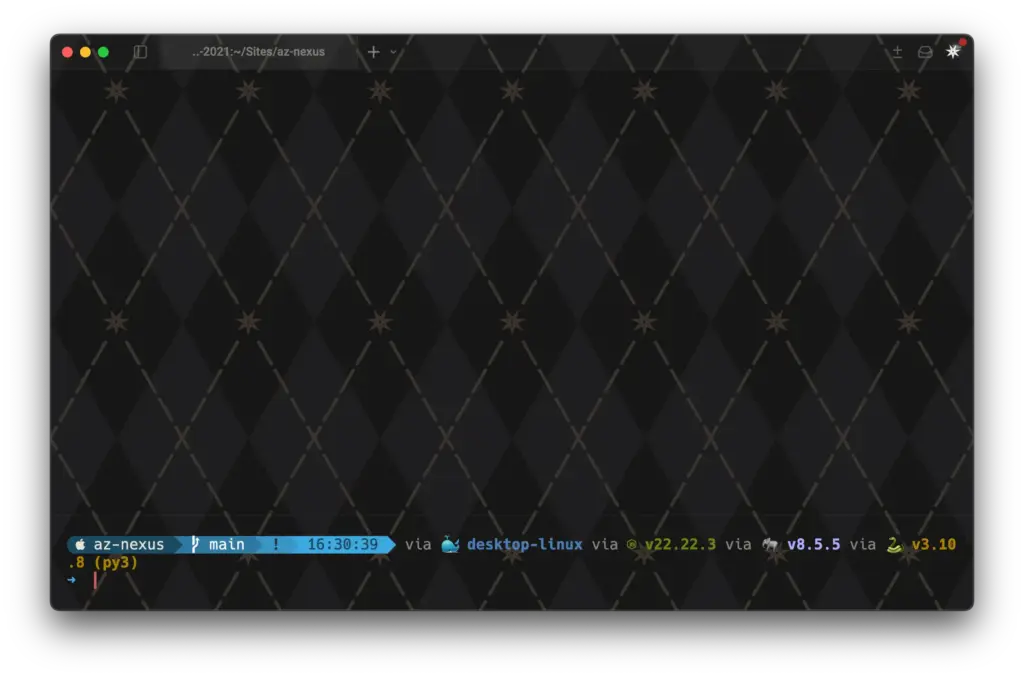
The biggest change wasn’t an alias or a plugin.
It was making the prompt useful.
My current prompt shows the project name, git branch, runtime versions, Docker context and operating system icon at a glance.
A typical session might tell me:
- which project I’m inside
- which branch I’m working on
- whether there are uncommitted changes
- which versions of Node, PHP and Python are active
- whether Docker is involved
That sounds small until you spend half the day jumping between repositories.
Context switching is where mistakes happen.
The prompt exists mostly to reduce those.
Keeping ZSH Manageable
One thing I learned from maintaining servers is that configuration files only ever move in one direction.
They grow.
My .zshrc is intentionally boring. It loads everything else and gets out of the way.
Configuration lives in separate files:
- aliases
- functions
- Starship
- Python
- NVM
- SSH shortcuts
When I want to change something, I already know where it lives.
Future me appreciates that.
The Commands I Actually Use
Most terminal screenshots on the internet seem to involve running neofetch and staring at colour gradients.
My most used commands are significantly less exciting.
reload
Reloads the shell after configuration changes.
lh
Generates desktop and mobile Lighthouse reports in one command.
minifyimg
Compresses entire folders of JPGs for web delivery.
push
Runs my git commit and push workflow without me having to remember the sequence.
None of these are particularly clever.
They’re just things I got tired of typing.
Makefiles Everywhere
The biggest workflow improvement isn’t actually ZSH.
It’s Makefiles.
Every project eventually develops a deployment ritual.
Push code.
SSH somewhere.
Pull changes.
Rebuild containers.
Clear caches.
Restart something.
The first ten times you remember the steps.
The hundredth time you forget one.
Most of my projects now hide that complexity behind commands like:
make deploy
The deployment logic stays inside the repository.
I don’t need to remember paths, containers, cache commands or deployment sequences anymore.
I just need to remember the verb.
Why I Bother
There is no productivity metric behind any of this.
I haven’t benchmarked shell startup times.
I haven’t compared plugins.
I haven’t calculated how many seconds Starship adds to startup.
The terminal is simply a tool I spend a lot of time looking at.
I like knowing where things are.
I like having commands that do one job well.
And I like opening a terminal that looks good.
That’s really the entire philosophy behind this setup.
Not optimisation.
Not minimalism.
Just removing a little friction from something I use every day.